| Version 11 (modified by thomas, 11 years ago) (diff) |
|---|
TOC(heading=Documentatie, sectionindex, compact, depth=2, allactive, ThomasHesselink/Documentatie/)? TOC(heading=Hoofdstukken, sectionindex, compact, depth=3, allactive, indirect=ThomasHesselink/Documentatie/Gebruiker/TOC)? TOC(heading=Inhoudsopgave, sectionindex, compact, depth=4, allactive, indirect=ThomasHesselink/Documentatie/Gebruiker/Dossier/TOC)?
2. Dossier
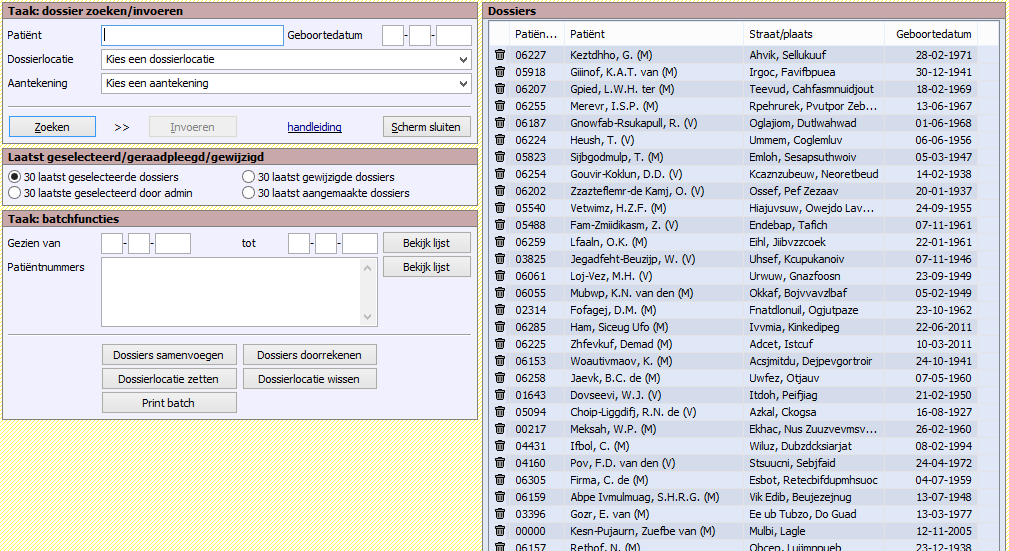
Het beginscherm Dossier is verticaal in tweeën gedeeld. Links staan een zoekblok en de batchfuncties en rechts zie je een lijst met patiënten. De patiënt van wie het dossier het laatst geopend is staat bovenaan de lijst, deze volgorde kun je zelf veranderen door op de onderstreepte kopjes te klikken. Je kunt een patiënt selecteren door erop te klikken in de lijst.

Attachments (1)
- dossier-zoeken-batch.png (97.1 KB) - added by thomas 11 years ago.
Download all attachments as: .zip